
The ERP in the pocket of the people in the field
A field app on top of an energy installation company's ERP: tasks with everything the job needs, attendance, before-and-after photos, materials and delivery notes reported to the tax authority, fleet, absences, expenses, chat and email, on a phone and on a computer.
- Line of work
- Custom software
- Year
- 2026
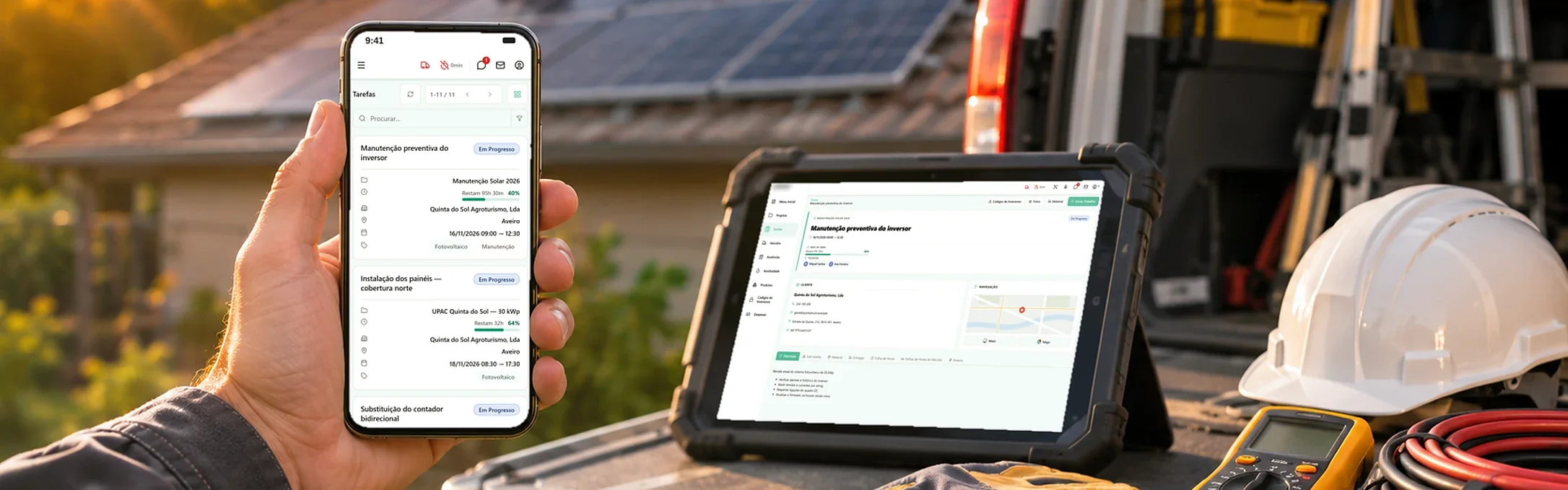
People who spend the day on site do not open the ERP. They need to know where they are going, what to take and what they left done, on their phone, between one installation and the next.
The client is an energy installation company (solar, HVAC and electric vehicle chargers) whose technicians spend most of the day at its clients' sites. The company's ERP held everything they needed (projects, tasks, clients, stock, fleet, attendance), but it was designed for people sitting at a computer in the office. We built a field app that brings the team the ERP data it needs and sends what happens on site back into the ERP, through the API access the company was already paying for.
The challenge
What a technician needed was in the ERP, but getting to it from a building site was another matter: the client's address and contact, the job description, the equipment to take, the inverter codes. And the way back was worse. Hours, photos, materials used, travel expenses and the day's attendance reached the office by phone, by message or on paper, when they reached it at all.
What does not get back into the ERP does not exist for the people who plan the week, invoice the work or answer the client. And every piece of information someone has to retype at the end of the day is a piece of information that can arrive wrong, or not arrive.
The solution
A web app that works on a phone and on a computer, with light and dark themes, and talks directly to the ERP. Each technician signs in with their own account.
Knowing what is coming before leaving
The week is in view, and technicians are told what is coming their way. Tasks appear as a list or a calendar, with the project, the client, the town and the planned time. Whoever is going to a site tomorrow knows today what they will be doing and what to prepare.
A task carries everything the job needs. The client, with phone, email, address and tax number; directions there, through Waze or Maps; the job description, the sub-tasks and the materials needed; the assigned technicians and how many of the planned labour hours are left. Nobody has to ring the office to ask for the address.
On site, from a phone
Records are made while the work is happening. The technician clocks in on the task, starts the work and logs the hours. They photograph the before and the after, describe what they did and record the materials they used, and all of it stays attached to the right task. Notes can be dictated instead of typed, which matters when your hands are full. And the inverter codes for each installation are right there, rather than on a piece of paper in the van.
Materials, delivery notes and expenses
Materials go out and come back with the paperwork done. The app shows what is waiting to be delivered and returned, and creates the delivery note on the spot, from the van to the client or back, with products chosen from the catalogue and the quantities in stock. Delivery notes and material dispatch notes are reported to the Portuguese Tax Authority (AT) automatically.
Expenses do not stay in a coat pocket. Fuel, tolls and the rest are recorded on the spot, with the receipt attached and scanned, the tax rate and who paid, the technician or the company. Each expense then follows its own status, from submitted to approved and paid, or rejected.
Fleet, attendance and absences
The fleet has a history. Each vehicle, with its registration, model, driver and mileage, and vehicle timesheets linked to the tasks they were used on.
Attendance and absences are recorded from the app. Each day's clock-ins and clock-outs are logged and visible across the month, and holidays, medical appointments and training are requested in the same place, instead of by email.
The team talking in one place
Chat and email, without leaving the app. There are discussion groups and conversations between the team, and the mailbox is built in: the warehouse says the materials are ready, the client confirms the visit, and the technician reads and replies without switching tools.
Built with
 Reactinterface
 Node.jsserver
TypeScript end to end, in the interface and on the server. The ERP remains the system where the company's data lives: the app reads from it and writes to it through the API, so what a technician records on site is in the ERP for the people working in the office.
The result
The technicians know the day before what they will be doing and what to take, and what they do on site reaches the ERP while they are still there: the hours, the photos, the materials, the delivery notes, the expenses and the attendance. The office no longer rebuilds each person's day from phone calls.
It is the kind of tool enbia builds for companies with teams in the field: a custom app on top of the ERP they already have, designed for people who work away from a desk.